
Marketplace feature · Brands
Menu import
Get your whole menu live without retyping a product. Start from what's already in Metrc, or bring the spreadsheet you use today.
How it works
Pick your source
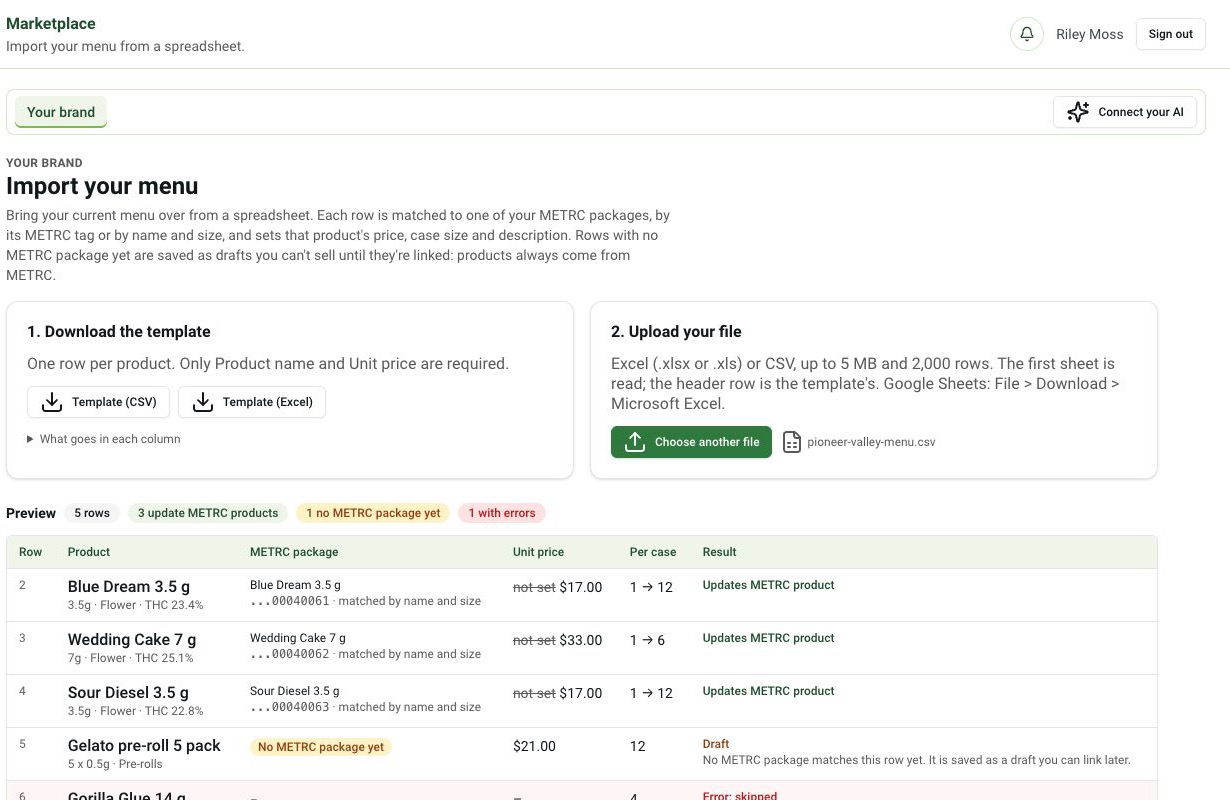
Connect Metrc and choose lab-passed packages, or upload a CSV or Excel file. You can also hand your sheet to Claude or ChatGPT.
Check the preview
Every row shows up as a listing with name, category, THC and Metrc tag, so you can fix anything before it goes live.
Set price and publish
Add case price, case size and minimums, then publish. Stores see it right away.
Why it matters
Most brands keep their wholesale menu in a spreadsheet that drifts away from what's actually in Metrc. Retyping it into another system is where the wrong strain, the old price or a failed package slips through.
Starting from Metrc means every listing carries its package tag and lab status from day one, so stores only see product that can legally ship.
Questions
Which file types can I import?
CSV and Excel files, or packages pulled straight from your Metrc account. You can also paste a sheet into Claude or ChatGPT and have it do the import.
What happens to products that aren't in Metrc yet?
They come in as drafts. A draft is never shown to stores until it's linked to a Metrc package and priced.
Can I update prices by importing again?
Yes. A second import shows what will change, line by line, and nothing changes until you confirm.